Asus ROG PG348Q 34-Inch Ultra-wide QHD Swift Curved Gaming Monitor
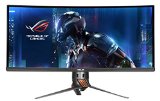
- 34″ 1440p IPS panel with NVIDIA G-SYNC Technology and 100Hz Refresh Rate deliver superior resolution, color, and smoothness, maximizing immersion in games.
- Curved Ultra-wide 21:9 Aspect Ratio maximizes immersion by expanding the display right to the peripherals of your vision
- ASUS Eye Care technology lowers blue light and eliminates flickering. When coupled with ergonomics, gaming marathons just got a lot easier.
- 5-Way OSD Joystick delivers the most intuitive control scheme for a monitor, so you can access features such as ASUS Game Plus on-the-fly.
- 3 year warranty
The ROG SWIFT PG348Q is truly the ultimate gaming monitor. Featuring a curved 34″ IPS display at 100Hz, 21:9 Ultra-wide 1440p, ergonomics, NVIDIA G-SYNC technology, and aesthetics without equal, the PG348Q breaks the boundaries of 16:9 and raises all aspects of gaming monitor technology to the absolute pinnacle.

List Price: $ 1,299.00
Price:
Related Gaming Monitors Products
(Visited 37 times, 1 visits today)
Useful things you should know about this monitor,
1. To go beyond 60Hz, you have to use the displayport. HDMI maxes out at 60Hz.
2. The monitor comes with a non-gold-plated HDMI cable and non-gold-plated DP cable. They both are about 5 foot long.
3. G-SYNC works only with displayport.
4. For the USB ports to work, you have to connect the included USB cable to the computer and the monitor.
5. Distance from back leg to front of monitor is exactly 1 foot. The screen spans 32.6 inches.
6. Do not like the light under the monitor? Turn it off in settings.
From the manual:
Panel Type TFT LCD
Panel size 34”W (21:9, 86.72 cm) wide screen
Max. Resolution 3440 x 1440
Pixel pitch 0.2325 mm
Brightness (Typ.) 300 cd/m2
Contrast Ratio (Typ.) 1000:1 (Do not be fooled by this low ratio. Research Contrast Ratio to see what it really is then you will see what I mean)
Viewing angle(H/V) CR>10 178˚/178˚
Display colors 1.07 B (8 bit+A-FRC)
Response time 5 ms
Color temperature selection 4 color temperatures
Analog input No
Digital input DisplayPort v1.2 x 1, HDMI v1.4
Earphone jack Yes
Audio input No
Speaker (Built-in) 2 W x 2 Stereo, RMS
USB 3.0 port Upstream x 1, Downstream x 4
Colors Black
Power LED White (On)/Amber (Standby)
Tilt +20˚~ -5˚
Swivel +50˚~ -50˚
Height adjustment 115 mm
VESA wall mount 100 x 100 mm
Kensington lock Yes
Voltage rating AC: 100~240V
DC: 19V, 6.32A (AC adapter)
Power consumption Power On: < 120 W, Standby: < 0.5 W,
Power Off: < 0.5 W
Temperature (Operating) 0˚C~40˚C
Temperature (Non-operating) -20˚C~+60˚C
Dimensions (W x H x D) 829 mm x 558 mm x 297 mm (highest)
829 mm x 443 mm x 311 mm (lowest)
320 mm x 508 mm x 942 mm (package)
Weight (Esti.) 11.1 kg (Net); 14.9 kg (Gross)
HDMI input:
1280 x 720 60Hz
1920 x 1080 50Hz
1920 x 1080 60Hz
3440 x 1440 50Hz (but a reviewer says he/she cannot get 3440 x 1440 with HDMI from laptop)
DisplayPort input:
640 x 480 60Hz
800 x 600 60Hz
1024 x 768 60Hz
3440 x 1440 60Hz
…with Over-clocking:
3440 x 1440 75Hz
3440 x 1440 80Hz
3440 x 1440 85Hz
3440 x 1440 90Hz
3440 x 1440 95Hz
3440 x 1440 100Hz
Mine came on the 11th. Been using it extensively. It has no dead pixel. It has a minor backlight bleed at top right corner (cannot really see it during normal use). You would have to look closely to see the light bleed when that part of the screen is black, so it is not a big deal at all. 1440p 100Hz and G-SYNC works flawlessly. The Witcher 3, Batman Arkham Knight, and Rise of the Tomb Raider look amazing
Last thing I want to point out… the brightness retention is really good. My old 27″ Asus’ screen becomes a lot darker when you look at the monitor slightly from above and a lot brighter when looking from below. This PG348Q’s screen does the same thing but the brightness level barely change when you’re looking at it at an off angle. In another word, the viewing angle of this monitor is a dozen times better.
Sept. 19th, 2016 Update: Monitor is still working fine. Guess I am one of the lucky buyers. Would hate to pack this giant thing up and send it away. Be aware that LG is releasing the 34UC79G-B with better specs and costs much less than this Asus monitor.
Was this review helpful to you?

|Third times not the charm,
These are beautiful monitors and the OSD menu and controls are definitely the best I’ve seen. I guess I’ll keep sending it back until I get the smallest amount of backlight bleed possible. The one my brother ordered a couple months ago only had an inch or so of backlight bleed in the right side corners. I guess it must be too expensive for ASUS to actually fix whatever manufacturing problems are causing this since they keep sending them out like this. I’m not sure if I’ll give up eventually and try ACER.
And no, lowering the brightness settings has had absolutely no effect on the backlight bleed of these monitors (does it ever?). I’ll update the review if I ever get a better one.
Update #1 (7/24/16):
Well, I’m getting closer I think. I would have honestly kept this one if not for the darker yellow backlight bleed in the upper right side. It was visible even with a bright light on. I’ve included a picture of the monitor.
Update #2 (8/2/16):
I tried editing this a few days ago but it never updated for some reason. But I thought I had finally hit the jackpot and got a good one with acceptable amount of backlight bleed in the right corners and only IPS glow in the left corners. But then I ran into a new problem. On the left side of the screen any page that is white like google or windows explorer would appear yellow-ish, but the right side looked normal. I started googling color uniformity and found an image that looked allot like my problem. Guess where I ended up? It was for a review several pages back for this monitor. So now I have two problems to watch for with replacements. I’ll include a picture of the backlight bleed and yellow-ish color uniformity issue.
Update #3 (8/2/16):
I forgot to re-add to my last update that I’ve been using TFTCentral’s color and brightness settings for this monitor, which look great. But I kept trying to play with the colors and brightness and all I would do is make everything else look worse trying to fix that color uniformity issue. But this update is for monitor #6 (#4 through amazon). The backlight bleed is not the greatest, but I’m honestly starting to care less and less about it since you really have no option with this model. But what is very distracting is the color uniformity issue. With monitor #6 it isn’t as bad on the lower left side, but on the upper left side there is a fairly large area of yellow-ish discoloration. I’ll include a backlight bleed and color uniformity picture.
Was this review helpful to you?

|Jul 25, 2016, 1:22:01 PM PDT
Hello, I would like to thank you for taking your time in writing this review. We certainly value your feedback. It is unfortunate to hear that your monitor is suffering from back light bleed. Have you tried calibrating your monitor’s brightness settings (ranges from 30-50) to see if that helps with the back light bleed? Also please try this. Go to the OSD MENU -> BLUE LIGHT FEATURES: mode to Level 4 .Sorry for the inconvenience this caused you. We are doing our best quality control for this model. Every NEW PG279Q sold in North America must now pass a visual inspection in a darkened environment before it’s shipped to a vendor. This will help with the back light bleed issues. What was the date of manufacturing of your monitors? We have an exchange program for these monitors. If your unit qualifies, we might be able to do an exchange for you. If you have any questions, you contact me at cl-justin@asus.com, I’m here to assist our customers with our products and dedicated in bringing a resolution to all issues that they may come across. Please copy a link to this post as reference.
Thanks for choosing ASUS
Regards,
Justin
ASUS Customer Loyalty