
EVGA GeForce 8400 GS 1024MB DDR3 PCI-E 2.0 Graphics Card DVI/HDMI/VGA 01G-P3-1302-LR
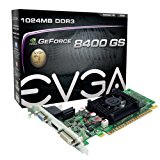
- EVGA 8400 GS has awesome features at an incredible value – Essential for watching HD DVD and Blu-ray movies on a PC.
- EVGA’s 24/7 Technical Support
- Base Clock: 520 MHz
- Memory Clock: 1200 MHz Effective
- CUDA Cores: 8
- Memory Detail: 1024MB DDR3
- Memory Bit Width 64 Bit / Memory Bandwidth: 9.6 GB/s
- Recommended PSU: 300W or greater power supply
Awesome features at an incredible value – the EVGA GeForce 8400 GS graphics cared delivers. Essential for watching HD DVD and Blu-ray movies on a PC, accelerating the Microsoft Windows Vista/7 experience, and powering Microsoft DirectX 9 and DirectX 10 games. Specifications include 520 MHz core clock, 1024MB (1GB) of DDR3 memory with a 600 MHz memory clock and 4.8 GB/second memory bandwidth, 64 bit memory bit width, 1230 MHz Shader Clock, 8 CUDA cores, and PCI Express 2.0 compatibility. Additional features include Microsoft DirectX 10 Shader Model 4.0 Support, NVIDIA PureVideo HD Technology, NVIDIA CUDA technology, OpenGL support, PCI-Express 2.0 support, Dual Link HDCP capability and Microsoft Windows XP/Vista/7 support. Connections are DVI, HDMI and VGA. Package includes the EVGA Driver/software disc and a limited 2 year warranty if registered within 30 days at www.evga.com.Minimum of a 350 Watt power supply.(Minimum recommended power supply with +12 Volt current rating of 18 Amps)

List Price: $ 32.23
Price:
Great for dual monitor set up,
When I first installed it one of the monitors had fuzzy text, graphics were good just the text was fuzzy. Did some trouble shooting and narrowed it down to a weak power supply (250w vs 350w recommended) or bad video card. Ordered a 400w power supply from Amazon for under $20 and both monitors are now crystal clear.
Was this review helpful to you?

|Simply the best bang for your buck : ) Just be smart about your power requirements.,
You know I almost did not buy this card as some of the bad reviews really scare you off. But in the end I went ahead and took the chance. I’m glad I did. Honestly I am not a big gamer but I do have a Pinball emulator on my computer with over 80 different pinball tables and some of the graphics are pretty intense. My old ATI 2 gig card butchered these pinball tables and I could hardly play them, but with this card every table is gorgeous and plays perfect. Video play back is very vivid and makes watching my movies like I have never seen them before. The colors absolutely pop now. And the icing on the cake for this card is the software. I have had many ATI cards and to be honest the software on this card blows ATI out the door. The best part is that the software gives you the ability to adjust your monitor colors so that what the card puts out is what you see on your monitor. On any other software they give you the option to adjust the colors too, but the problem is that if you have an older monitor or a new one, they all show colors differently. So when you adjust the color on the software, what you adjust may not be what you see on your monitor. Not sure if this makes sense or if I am describing it properly but once you use the color adjust on this card and it’s software you will understand. You just slide the colors till they match on your monitor and walla, your done. Now what you see on your monitor is exactly what the card is putting out. If your into video or picture editing this is a huge thing, as sometimes when you are editing a color and then when you print the picture you find that it does not look the same. That’s because most of the time the colors you see on your monitor are not synced with your video card.
Also for those that talk about power wattage problems. You have know that if you under power any electronics that need more juice to run right, you run the risk of burning them up. If they say you need the bare minimum of a 300 watt power supply, you should already know that the card if pushed hard is going to need at least half that much to run properly. Also you have to understand that every computer is built differently and some use a bunch of power just for the main board and such. If you have a couple of CD drives and hard drives running all at the same time and you put this card in the machine and then you start to have problems, it’s because your computer is already taking a lot of juice from the power supply and now with this new card, you are taxing it to the limit. So buying this card requires some working knowledge of your computer and it’s power draws. Most companies put only the minimum power supply that will support their hardware specs to save money. So if you have more stuff added to your machine, you run the risk of either burning up the power supply or some of the stuff in your computer. So do your self a big favor and save your self a lot of heart ache. If you have a small power supply and want to put this card in your computer then get a bigger power supply. I have a quad core that came with a 500 watt power supply and I upgraded it to a 750 watt power supply because the old one died for the very same reason I just talked about. Power supplies are not very expensive and they only use the extra power when it is required of them. As for fan noise problems? Mine is as quiet as a mouse. (sleeping that is) : p
Was this review helpful to you?

|